Building the VKI NSU Schedule PWA: From First Line of Code to Hundreds of Daily Active Students
Building the VKI NSU Schedule PWA: From First Line of Code to Hundreds of Daily Active Students
In student life, certain inconveniences become accepted as unavoidable facts of existence. For students at the Higher College of Informatics of Novosibirsk State University (VKI NSU), the daily class schedule remained such an inconvenience for years. The college administration published it exclusively as multi-page PDF documents, manually laid out without any programmable API.
Every morning, hundreds of students repeated the same exhausting routine: visit the official website, download a heavy document to their smartphone, open a PDF viewer, and pinch-to-zoom across a dense grid with two fingers, desperately searching for their group number among dozens of identical cells. Worse still, the schedule was needed not just once in the morning, but before every single class: checking room numbers, verifying instructor names, or confirming that a lecture had not been abruptly moved to another building.
Physical environment compounded the problem: the historic brick building with meter-thick masonry and a basement gym—where physical education classes take place during the Siberian cold season—functioned as literal Faraday cages. Cellular signals plummeted to absolute zero. If a student forgot to pre-download the file, they found themselves completely cut off right outside locked classroom doors.
In this article, I want to share the complete technical story behind creating an independent PWA: the journey from naive late-night experiments and early false starts to mature production architecture, thoughtful technology selection, table reverse-engineering, and building a bulletproof offline-first client.
1. The February False Start: Gravity UI, Vibe-Coding, and a Pivot to SUTD
The project began on February 5. Around midnight, a sudden thought struck me: why should students at one of Siberia’s leading IT colleges in 2025 strain their eyes over archaic documents every morning? Modern web ecosystems offer reactive frameworks, progressive web applications, and fluid interfaces.
A strong impulse took over: spend the night building a fast, modern schedule web app. For the design system, I chose Yandex’s Gravity UI. Its component kit felt sleek, minimalist, and perfectly suited for dense data grids, group selectors, and timetable matrices.
I mocked up initial screens using real VKI schedule data, began building a React frontend, and started experimenting with a backend. And right here, I fell squarely into the trap of blind “vibe-coding.”
At that time, I was not a Python developer. I had minimal familiarity with the language’s ecosystem, knew little about async web frameworks, and understood even less about document processing internals. In the era of modern LLMs, it felt like understanding PDF mechanics was unnecessary: surely one could simply feed a document into an AI model and prompt it to generate a clean JSON parser.
Reality swiftly and ruthlessly dismantled that naive optimism.
A PDF is not a database, not structured HTML, and certainly not a spreadsheet. It is a low-level stream of drawing instructions for a virtual printer: draw a vector segment at physical coordinates (x, y) and place a specific font glyph at a defined offset. The source document contains no semantic concepts of “row”, “column”, or “table cell.” There are only visual lines and floating text fragments positioned on a coordinate canvas.
The AI-generated script produced total gibberish:
- Merged lecture cells randomly attached to arbitrary subgroups.
- Sub-millimeter column shifts broke the correspondence between time slots and classroom numbers.
- Inconsistent instructor initials spawned dozens of phantom duplicate entries.
Diving into coordinate geometry and vector heuristics in the middle of the night was overwhelming. The initial spark died out, discouragement set in, and the VKI project went on the shelf. It became a crucial engineering lesson: you cannot build a reliable system on top of input data whose physics you do not fundamentally understand.
However, the invested effort was not wasted. Soon after, an opportunity arose to build a schedule service for another university—Saint Petersburg State University of Industrial Technologies and Design (sutd.okak.pw).
The contrast was staggering. Unlike VKI, SUTD published schedules as well-structured Excel spreadsheets (.xlsx) that administrative staff did not constantly rearrange. Parsing them with standard libraries was straightforward: clean tabular grids, predictable cell references, and zero vector chaos.
The Gravity UI design originally conceived for VKI adapted seamlessly to the new project. Working on SUTD allowed me to refine client state management, component architecture, academic week handling, and API communication without unnecessary stress. It served as an ideal proving ground, preserving the foundation for an eventual return to my home college.
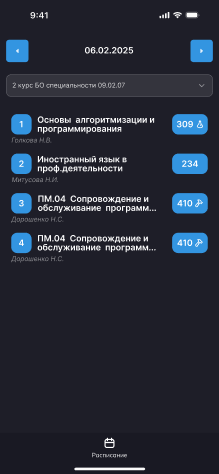
2. Second Attempt: Turning 18, Moving Beyond Discord Bots, and Choosing PWA
By early summer, several life milestones converged. First, I turned 18—a psychological milestone that prompts reflection on how one spends one’s time. Second, I reached total, irreversible burnout from years of building Discord bots.
I had spent years developing bots, managing infrastructure, and configuring integrations. But eventually, a realization crystallized: building Discord bots meant spinning wheels inside someone else’s closed platform. I wanted to advance to an entirely different professional level: building full-fledged, independent web applications used by real people in physical environments to solve everyday problems.
For the cancelled Discord bot project, I had already hired a talented designer, Arlen. We had known each other for a long time, and I had sent him a small deposit for upcoming work, of which he had only completed preliminary Figma wireframes.
I approached him and said: “The bot is cancelled; I do not want to pursue it anymore. Let us instead build a clean, elegant schedule app for our college.”
Arlen embraced the idea immediately. The project moved beyond freelance work and became a joint passion project—pursued for real-world experience, a standout portfolio case, and genuine utility for our fellow students.
During the design phase, we encountered an amusing practical challenge. Arlen initially created mockups exclusively in light mode. The reason was entirely practical: configuring design tokens and variables for seamless theme switching in Figma required a paid team subscription. For a non-commercial student project, spending money on Figma subscriptions was impractical, so dark mode had to be carefully drawn, balanced for contrast, and coded manually later.
Platform Selection: Why Progressive Web App?
We faced a foundational architectural question: how should we deliver the product to users? Platform choice would define the entire lifecycle of the service.
Native iOS (Swift) and Android (Kotlin) apps were ruled out early for critical reasons:
- Financial and Sanction Barriers: Apple’s Developer Program requires $99 annually. For a student in Russia, paying this fee is exceptionally difficult. Committing to annual costs for a non-commercial college utility made little financial sense.
- Review Delays (App Store Review): When college administration suddenly modifies PDF formatting or class structures, client-side hotfixes must deploy within minutes. Waiting 2–3 days for Apple review would leave students without schedules for half a week.
- Resource Overhead: Maintaining two independent native codebases for a focused student utility demanded time resources we simply lacked.
A conventional website bookmarked in a mobile browser was equally inadequate. Fumbling through browser tabs, typing URLs, and waiting for network responses outside a lecture hall created unacceptable friction.
The answer was the Progressive Web App (PWA) standard, combining web flexibility with native ergonomics:
- Zero-Friction Home Screen Installation: Installs directly from the browser without an app store, gains a dedicated home screen icon, launches in standalone mode (
display: standalone) without browser chrome, and feels virtually indistinguishable from native software. - Instant Deployment: Updated bundles propagate automatically on subsequent app launches.
- True Offline-First Capability: Service Worker combined with Cache Storage ensures the schedule renders instantly, even in airplane mode deep within basement sports facilities.
In our Vite build configuration, we integrated vite-plugin-pwa with the injectManifest strategy. This provided complete control over the Service Worker lifecycle, merging asset precaching with system push notification handling:
import { defineConfig } from "vitest/config";
import { VitePWA } from "vite-plugin-pwa";

export default defineConfig({
    plugins: [
        VitePWA({
            srcDir: 'src',
            filename: 'sw.ts',
            registerType: 'autoUpdate',
            strategies: 'injectManifest',
            manifest: {
                id: 'vki',
                name: 'ВКИ НГУ',
                short_name: 'ВКИ НГУ',
                start_url: '/?v=102',
                display: 'standalone',
                theme_color: '#007AFF',
                background_color: '#007AFF',
                icons: [
                    {
                        src: 'pwa-192x192.png',
                        sizes: '192x192',
                        type: 'image/png'
                    },
                    {
                        src: 'pwa-512x512.png',
                        sizes: '512x512',
                        type: 'image/png'
                    }
                ]
            }
        })
    ]
})
The Service Worker itself (sw.ts) remained lean and focused:
/// <reference lib="webworker" />
import { precacheAndRoute } from "workbox-precaching";

precacheAndRoute(self.__WB_MANIFEST)

declare const self: ServiceWorkerGlobalScope

self.addEventListener('push', (event: PushEvent) => {
    const data = event.data?.json() || {}

    self.registration.showNotification(data.title || 'ВКИ НГУ', {
        body: data.body || 'Новое обновление расписания',
        icon: '/pwa-192x192.png',
        badge: '/pwa-72x72.png'
    })
})
This architecture delivered immediate interface initialization and native OS notifications.
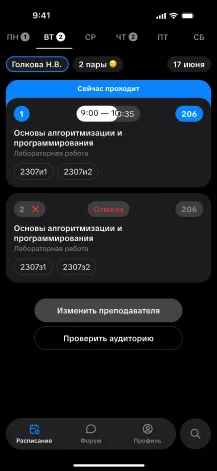
3. First-Generation Architecture: Server Parser and Client-Side Offline
On June 21, development entered full-scale active mode. The point of no return had been crossed: no more excuses or postponements. With just over two months remaining until the new academic year, we needed to build a reliable production pipeline from scratch.
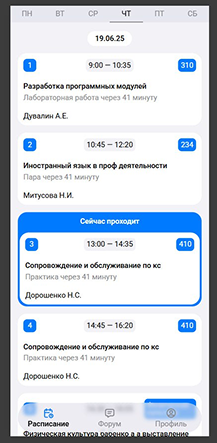
My first step was surveying existing solutions. Earlier students had attempted automation through an open-source project named VkiHub.
Analyzing VkiHub provided valuable domain context: its codebase already contained baseline regular expressions for detecting group patterns and known document quirks. However, adopting VkiHub directly was unfeasible:
- It relied on an outdated, resource-heavy stack ill-suited for low-cost hosting.
- It lacked any concept of PWA architecture or mobile offline capability.
- The monolithic architecture was tightly coupled to legacy assumptions, preventing dynamic client expansion.
I decided to write the backend from scratch with a modern stack: FastAPI + Uvicorn + PyMuPDF + Camelot.
Anatomy of the First-Gen Parser
The backend had a single core mission: poll the college portal periodically, retrieve fresh PDF schedules, deterministically extract the grid of classes, and produce clean, structured JSON.
For table parsing, we selected Camelot. To accelerate processing and eliminate heavy external command-line dependencies, we implemented a custom ConversionBackend utilizing pymupdf. It rasterized PDF pages on the fly at 120 DPI for morphological line detection:
class ConversionBackend:
    def convert(self, pdf_path, png_path):
        pymupdf.Document(pdf_path)[0].get_pixmap(dpi=120).save(png_path)

class Parser:
    def __init__(self):
        self.conversion_backend = ConversionBackend()

    def extract_teacher_name(self, content):
        teacher_match = re.findall(r'\b[А-ЯЁ][а-яё]*\s[А-ЯЁ]\.\s?[А-ЯЁ]\.?\b', content)
        teacher = teacher_match[0] if teacher_match else ''
        if content.startswith('НГУ') or content.startswith('Нгу'):
            teacher = self._get_teacher(content)

        if teacher:
            formatted_teacher = teacher + '.' if not teacher.endswith('.') else teacher
            if formatted_teacher[-3] == ' ':
                formatted_teacher = formatted_teacher[:-3] + formatted_teacher[-2:]
            return formatted_teacher, content.replace(teacher, formatted_teacher)

        return teacher, content

    def extract_classroom(self, content):
        classroom_match = re.findall(r'\b\d{3}[a-zа-яё]?\b', content)
        classroom = classroom_match[0] if classroom_match else ''

        if content.startswith('НГУ') or content.startswith('Нгу'):
            classroom = f'НГУ {classroom}'

        for special_room in ['Читальный зал', 'Актовый зал', 'Физкультура', 'Физическая культура']:
            if special_room in content:
                classroom = special_room
                break

        return classroom
Data normalization required meticulous care:
- Instructors: Initials varied wildly across documents (
Ivanov I.I.,Ivanov I. I., orIvanov I.Iwithout a closing period). Our regular expressions and formatting functions standardized them with a trailing period and uniform spacing. - Classrooms: Beyond standard three-digit room numbers (
214,308a), the parser recognized named venues (“Reading Room”, “Assembly Hall”, “Gym”), as well as university campus lectures prefixed withНГУ.
First-generation Camelot invocation balanced extraction speed with baseline line detection:
tables = camelot.read_pdf(
    pdf_path,
    pages='all',
    copy_text=['h', 'v'],
    line_scale=55,
    joint_tol=12,
    line_tol=12,
    backend=self.conversion_backend
)

schedule = {}
for table in tables:
    data = table.df.values.tolist()
    if 'время' in data[0]:
        continue

    data = self.process_table_data(data)
    data, week_dates = self.fix_missing_data(data)

    for i in range(1, len(data)):
        row = data[i]
        for j in range(2, len(row)):
            if row[1].endswith('.5') and data[i][j] == data[i-1][j]:
                continue

            content = self.parse_lesson_content(row[j])
            teacher, content = self.extract_teacher_name(content)
            classroom = self.extract_classroom(content)
            group_name = data[0][j]
            day_name = row[0]

            if group_name not in schedule:
                schedule[group_name] = {}

            if day_name not in schedule[group_name]:
                schedule[group_name][day_name] = {
                    'date': week_dates.get(day_name, ''),
                    'lessons': []
                }

            schedule[group_name][day_name]['lessons'].append({
                'content': content,
                'number': row[1],
                'group': group_name,
                'teacher': teacher,
                'classroom': classroom,
                'cancelled': 'отмена' in row[j].lower()
            })
Notice the fractional .5 slot handling: when administrators split a class between two subgroups or alternated schedules between even and odd weeks (numerator/denominator), fractional indexing maintained strict chronological ordering.
Client Architecture and Stale-While-Revalidate
On the frontend (React + Redux Toolkit), our primary objective was guaranteeing instantaneous launch regardless of network quality.
Persisting the entire multi-megabyte JSON schedule payload across all departments and academic years directly into localStorage was inefficient. It would quickly hit storage constraints and introduce noticeable main-thread serialization lag.
Instead, we designed an intelligent selective synchronization utility, syncScheduleCache, inside util.ts:
export const syncScheduleCache = (schedule: any) => {
    if (!schedule) return
    const storage = getStorage()
    const favorites = storage.favorite || []
    const params = new URLSearchParams(`?${localStorage.getItem('params') || ''}`)
    const selected = params.get('group') || params.get('teacher') || params.get('classroom') || null

    let cache = getScheduleCache() || {}

    if (selected && schedule[selected]) {
        cache[selected] = schedule[selected]
    }
    favorites.forEach((f: string) => {
        if (schedule[f]) cache[f] = schedule[f]
    })

    for (const key of Object.keys(cache)) {
        if (key !== selected && !favorites.includes(key)) {
            delete cache[key]
        }
    }

    if (Object.keys(cache).length) setScheduleCache(cache)
    else localStorage.removeItem('ci-schedule-cache')
}
The algorithm retains strictly what the individual user needs: the currently selected group alongside pinned favorites. Superfluous groups are pruned automatically, keeping storage footprint tiny.
The application initialization sequence in App.tsx applies the classic Stale-While-Revalidate (SWR) pattern:
const cached = getScheduleCache()
if (cached) {
    this.props.setSchedule(cached)
}

const promise = fetch(`${apiUrl}/schedule`).then((r) => r.json()).catch(() => null)

const handleRes = (res: any) => {
    if (res?.ok) {
        this.props.setSchedule(res.result)
        syncScheduleCache(res.result)
    }
}

if (cached) {
    promise.then(handleRes)
} else {
    const res = await promise
    handleRes(res)
}
In practice:
- If the student opened the app previously,
getScheduleCache()restores classes from memory in 0 milliseconds. The UI renders immediately without spinners—even in deep basement dead zones. - Concurrently, a background network request polls the API.
- Once the server responds with fresh data, Redux state updates quietly and refreshes local cache without interrupting user interaction.
- On a first cold launch without cache, the app awaits the initial network response before rendering.
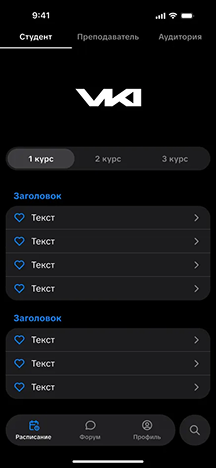
4. Expanding the Ecosystem: Profiles, Web Push, and the Closed Forum
With the core schedule engine proven stable, an ambition emerged to evolve beyond a read-only utility. We wanted to transform the project into a trusted digital space for the entire student body.
The first major addition was authentication and user profiles. Security was paramount: opening open registration via social networks or standard email risked immediate spam, toxicity, and disruption.
We made a strict architectural decision: profile authentication was restricted entirely to corporate college Google accounts on the @mer.ci.nsu.ru domain. This provided total verification:
- Every community member was a verified student or faculty member.
- Users displayed real names verified against institution directory records.
- Fake accounts and anonymous trolling were eliminated at the gate.
Following sign-in, users could enable Web Push notifications via VAPID (pywebpush). The server generated a unique cryptographic subscription, stored it in PostgreSQL, and linked it to the student profile.
Schedule update dispatching presented a subtle scheduling problem. Administration never published all departments simultaneously: documents appeared in batches throughout the evening—one year at 18:00, another at 19:30, and final sheets closer to 22:00. Waiting for all documents meant notifications fired late at night. Broadcasting indiscriminately on every file upload spammed users and triggered unsubscribes.
We built a targeted micro-push dispatch algorithm: a background worker matched updated groups against individual user subscriptions, sending an instant alert (Schedule updated for group 2307i1) the exact minute their specific PDF parsed. A college-wide notification dispatched only when all documents for the day finished processing (is_complete).
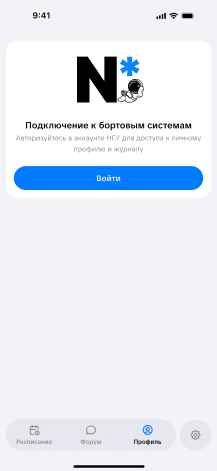
The Closed Student Forum
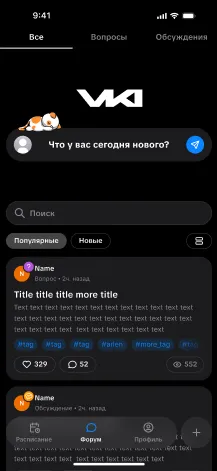
Following profile integration, we embarked on the summer’s most ambitious feature: a closed student forum built directly inside the PWA. We designed it with the rigor of a dedicated social platform:
- Two Core Publication Formats:
- Questions: Dedicated to homework assistance, laboratory work, and course project troubleshooting.
- Discussions: An open arena for student initiatives, hackathon team formation, and casual conversation.
- Interactive Color Tags: Categorization by subject (“Programming”, “Mathematics”, “Networking”) with instant tag-based feed filtering.
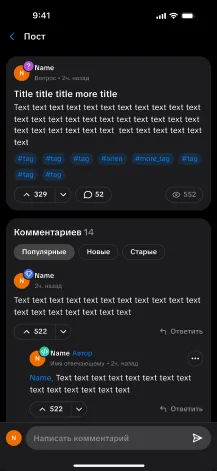
- Threaded Comment System: Full nested reply chains with instant Web Push delivery to original authors on new responses.
- Gamification & Badges: Distinct SVG avatar badges—developer (
badge_dev), designer (badge_design), beta tester (badge_beta), paired with public view counts and reaction tallies. - Algorithmic Feed Ranking: A popularity formula
Score = Likes * 3 + Viewselevated actively discussed threads while older discussions naturally subsided. - Server-Side Anti-Flood: A strict 15-minute cooldown between publications. Premature submission attempts returned HTTP 429 alongside a countdown timer.
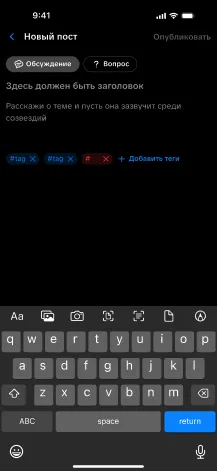
Arlen kept the post creation interface clean and focused: post type selection, title input, message body, and interactive tag chips.
Individual discussion views featured a complete thread layout with author role badges and nested responses.
5. August Production Launch: Confronting Reality and the Overlooked 4th Year
By late August 2025, the application was fully assembled, tested locally, and prepared for public deployment. We provisioned a Linux VPS, configured Nginx as a reverse proxy, acquired Let’s Encrypt SSL certificates, and deployed the initial public PWA release.
We felt prepared: design was polished, offline mode tested in airplane mode, the forum functional, and push pipelines verified.
Then came September 1—the day production realities shattered our theoretical assumptions.
Throughout July and August, parsers and clients had been tested exclusively on PDF files published as of June 21. By late June, graduating 4th-year students had completed their defenses and departed. In mid-summer PDFs, 4th-year tables did not exist at all. We had committed a classic beginner oversight: we were so absorbed in parsing 1st, 2nd, and 3rd years that we forgot the 4th year even existed in the college.
When administrators published fall semester schedules on September 1, the server was flooded with unexpected groups and files for graduating cohorts. The parser choked instantly on unrecognized group codes, regular expressions broke down, and the client interface lacked UI selectors for 4th-year streams.
The first two weeks of September became an intense hotfix marathon. We added 4th-year support across backends and databases, updated client selectors, adjusted regex rules on live servers, and verified nocturnal PDF updates.
The stress test yielded remarkable results: students instantly recognized the utility of the service. Links circulated across group chats and student representatives. By mid-September, daily traffic stabilized at 50 Daily Active Users (DAU). It marked our first genuine operational milestone.
6. The March 15 Crisis: Broken Tables, Phantom Official Portals, and Rebirth via Camelot
By spring 2026, the service reached robust maturity. Daily active engagement surpassed 250 DAU. For a student body of roughly 800 enrolled students, over a third of all full-time attendees relied on our PWA between classes every day.
Then came March 15, 2026—a decisive turning point for the project.
Two related events unfolded simultaneously:
- College administration completely revamped their PDF generation pipeline: fonts, page layouts, table headers, and vector geometries changed overnight.
- Concurrently, the administration announced its own official schedule portal at
https://table-ci.nsu.ru/.
Initially, an official portal seemed poised to make our independent service obsolete. Reality proved otherwise.
The official portal proved unreliable: it frequently crashed, inverted even/odd week calendars, displayed phantom classes in incorrect rooms, and by September 2026 collapsed into a persistent network timeout.
However, our application suffered a catastrophic failure: our first-generation parser, reliant on fragile heuristics from VkiHub and line_scale=55, failed entirely against the new layout. Tables disintegrated, cells merged into unreadable clumps, and invalid records polluted our database. Our support channels filled with hundreds of anxious student messages: “Where is the schedule? What happened?”.
Moving Beyond Vibe-Coding to Intentional Reverse-Engineering
March 15 drove home a definitive lesson: blind vibe-coding has no place in production systems.
Feeding broken PDFs into AI models hoping an LLM would diagnose rendering artifacts was futile. I set everything aside, examined Camelot source code, read OpenCV documentation, and tackled the mathematics of vector contour detection.
Camelot operates in two primary modes:
stream: Constructs columns based on whitespace and textual distances.lattice: Employs OpenCV computer vision to detect physical intersections of rendered table grid lines.
The trap in VKI’s new format was hairline borders: cell dividers were rendered thinner than 0.5 points. Default Camelot settings (line_scale=15) and our previous line_scale=55 treated them as rasterization noise and discarded them, merging adjacent classes into single monolithic cells.
Resolution came through precise geometric calibration:
- Extreme Scale (
line_scale=100): Forcing OpenCV morphological kernels to capture sub-pixel vector dividers. - Gap Bridging (
joint_tol=4,line_tol=2): Permitting slight rendering tolerances at line intersections to close broken contours reliably. - Spanned Cell Replication (
copy_text=['h', 'v']): Automatically replicating shared text across merged lecture columns and rows. - Poppler Engine Backend: Leveraging Poppler for high-fidelity vector rasterization.
tables = camelot.read_pdf(
    path,
    pages='all',
    copy_text=['h', 'v'],
    line_scale=100,
    joint_tol=4,
    line_tol=2,
    backend='poppler'
)

for t in tables:
    matrix = self.table_to_matrix(t.df.values.tolist(), file_url)
    data = self.merge(data, matrix)
Extracting clean table matrices through Camelot solved only half the challenge. Because the PDF generation template changed completely, all downstream cell extraction routines failed: instructors merged with course names, room numbers ended up inside lesson titles, and administrative annotations (“remote”, “consultation”, “grade resolution”, “exam”) were scattered arbitrarily.
Our entire semantic normalization pipeline had to be rebuilt from scratch. The centerpiece of this second-generation parser became parse_cell(self, text: str):
def parse_cell(self, text: str):
    if not text or not text.strip():
        return None

    text = self.clean_text(text)

    teacher = self.extract_teacher(text)
    classroom = self.extract_room(text)
    isDistance = 'дистанцион' in text.lower() or 'дистант' in text.lower()
    isLecture = 'лекци' in text.lower()
    lesson_text = self.extract_subject(text)
    lesson = self.normalize_lesson(self.remove_duplicate_words(lesson_text))

    if not lesson:
        return None

    if len(lesson.strip()) <= 3 or re.match(r'^[А-ЯЁA-Z]\.?\s*[А-ЯЁA-Z]?\.?$', lesson.strip(), re.IGNORECASE):
        return None

    if not teacher:
        m = re.search(r'\b([А-ЯЁ][а-яё]+(?:ова|ева|ина|ына|ский|цкий|ов|ев|ин|ын|ич|их|ых|юк|ук|ак))\s*$', lesson)
        if m:
            teacher = m.group(1)
            lesson = lesson[:m.start()].strip()

    formatted_lesson = None
    if lesson:
        if lesson.isupper():
            formatted_lesson = lesson[0].upper() + lesson[1:].lower()
        else:
            formatted_lesson = (lesson[0].upper() + lesson[1:]) if lesson.lower() == lesson else lesson

    if classroom and formatted_lesson:
        formatted_lesson = formatted_lesson.replace(classroom, '').strip()

    if formatted_lesson:
        formatted_lesson = re.sub(r'[\s.,:;_-]+$', '', formatted_lesson)

    isIssusing = 'выставле' in text.lower() or 'задолженност' in text.lower() or ('пар' in text.lower() and 'нет' in text.lower()) or not lesson

    return {
        'line': self.remove_duplicate_words(text) if isIssusing else text,
        'lesson': formatted_lesson,
        'teacher': teacher,
        'classroom': classroom,
        'isLecture': isLecture,
        'isDistance': isDistance,
        'isPractice': bool(re.search(r'\bпракт', text.lower())),
        'isExam': 'экзам' in text.lower(),
        'isIssusing': isIssusing,
        'isConsultation': 'консул' in text.lower(),
        'isCanceled': 'отмен' in text.lower()
    }
This algorithm transformed raw PDF strings into strongly typed structures:
- Isolating classroom identifiers and removing them cleanly from course names when text merged during rendering.
- Identifying instructors with fallback heuristics analyzing Russian surname suffixes (
-ova,-skiy,-in,-ev) when initials were missing. - Eliminating duplicate tokens via
remove_duplicate_words. - Tagging classes with semantic booleans (
isLecture,isPractice,isExam,isDistance,isConsultation,isCanceled,isIssusing), enabling visual badges and color accents in the client UI.
The overhauled parser proved rock-solid. Service was fully restored within days, and by academic year-end, user engagement expanded to 300 registered profiles, 200 sustained DAU, and over 1,000 monthly active users (MAU).
7. Product Hygiene: Decommissioning the Forum and Launching the “Study” Hub
By August 2026, we conducted a candid product audit ahead of the new school year. The primary candidate for reassessment was our closed student forum.
From an engineering and craft standpoint, the forum was an accomplishment: responsive layouts, threaded discussions, role badges, anti-spam mechanisms, and Google Workspace authentication. Yet in practical daily use, it was largely dormant. Over an entire academic year, only a few dozen threads appeared.
Our post-mortem identified four fundamental factors:
- Audience Demographics: Computing programs attract a significant number of introverted students who are disinclined toward public posting on unfamiliar platforms. College leadership frequently organizes dedicated extracurricular activities specifically to encourage student socialization.
- Stressful Life Transitions: 1st and 2nd-year students navigate immense pressure: exam sessions, rigorous academic demands, independent living, and coursework. They lack energy to write long-form posts on a standalone portal.
- Entrenched Telegram Habits: Every cohort, department, and study group maintains active Telegram group chats established over years. Migrating everyday communication to a web forum proved unrealistic.
- Quick-Lookup Usage Patterns: Students access schedule apps for 5–10 seconds: glance at the classroom before the bell and pocket their phones. No one visits a lookup utility seeking long-form reading material.
Maintaining thousands of lines of dead code was an engineering anti-pattern. On August 27, 2026, in a single commit, we deleted 75 files and 4,497 lines of forum code.
Discarding weeks of effort was emotionally difficult, but it was an essential step in professional growth: true software engineering requires knowing when to prune code that does not deliver genuine user value.
The Academic “Study” Hub (/study)
The newly freed central navigation slot was occupied by a focused academic module addressing practical daily student requirements:
- Real-Time Free Classroom Monitor (
/classrooms): An interactive tool displaying unoccupied classrooms for the current period or any selected weekday. The list categorizes available and occupied rooms, supports pinning favorites, and features playful empty-state messaging (“No rooms available, hold tight—everything is booked except our hope” during peak hours, or “A buffet of classrooms—more seats than students” on quiet afternoons). - Intelligent Navigation and Tooltips (
ClassroomTooltip& 2GIS):- Not all classes take place in standard numbered rooms: schedules frequently list long textual descriptions like “reading hall A”, “assembly hall”, “sports complex”, or “student computer lab”. In compact mobile cards, lengthy text overflows classroom badges. The UI replaces them with compact chips (e.g.
ЧЗ-А) and thematic icons. Tapping the chip triggersClassroomTooltip, displaying the full human-readable title (“Reading Hall A”, “Student Computer Bureau”, “Gymnasium”, “Assembly Hall”, “Remote Learning”). - When classes take place at the main university campus, cards render an interactive badge linking directly to 2GIS (
MapNsuLecture), opening building coordinates on the city map to prevent navigation confusion for incoming freshmen.
- Not all classes take place in standard numbered rooms: schedules frequently list long textual descriptions like “reading hall A”, “assembly hall”, “sports complex”, or “student computer lab”. In compact mobile cards, lengthy text overflows classroom badges. The UI replaces them with compact chips (e.g.
- Verify Schedule Sheet: Students occasionally experience natural anxiety: “What if the app missed an update or cancellation?”. We integrated a verification drawer allowing students to open the original source PDF from college servers or visit the official administrative page with one tap.
- Separation of “Journal” (
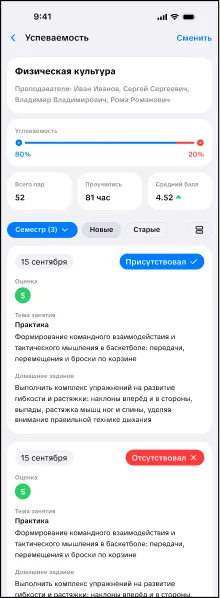
/journal) and “Gradebook” (/grade): The hub unifies two academic workflows via session-authenticated integration with NSU’s portal (cab.nsu.ru):- Electronic Journal: Reflects weekly semester rhythms—homework assignments, class topics, absence tracking (“H” marks), and continuous assessment scores with visual distinction for midterms and credit deadlines.
- Official Gradebook: Extracts verified examination records across all completed semesters. The
grade(self)method extracts transcript numbers, specializations, examination grades with instructor names, overall grade point averages, and final diploma projections:
async def grade(self):
    try:
        headers = {
            'Cookie': self.cookie,
            'X-Requested-With': 'XMLHttpRequest',
            'Referer': 'https://cab.nsu.ru/student/grade'
        }
        async with self.session.get('/student/grade?load-widget=true', headers=headers) as r:
            if len(r.history) != 0 or r.status == 403:
                return None

            soup = BS(await r.text(), 'html.parser')
            header = soup.find('div', class_='block-header')
            if not header:
                return None

            number = ''
            specialty = ''
            for title in header.find_all('h4', class_='block-header-title'):
                title_text = title.text.strip()
                if 'Номер:' in title_text:
                    number = title_text.replace('Номер:', '').strip()
                elif 'Специальность:' in title_text:
                    specialty = title_text.replace('Специальность:', '').strip()

            average_rating = ''
            diploma_rating = ''
            for store_block in header.find_all('div', class_='average-store'):
                store_title = store_block.find('div', class_='title')
                store_val = store_block.find('div', class_='store')
                if store_title and store_val:
                    st_text = store_title.text.strip()
                    if 'Общий средний балл' in st_text:
                        average_rating = store_val.text.strip()
                    elif 'Средний балл диплома' in st_text:
                        diploma_rating = store_val.text.strip()

            terms = []
            tab_panes = soup.find_all('div', class_='tab-pane')
            for pane in tab_panes:
                pane_header = pane.find('h4', class_='block-header-title')
                pane_title = pane_header.text.strip().replace('Успеваемость за ', '').strip() if pane_header else pane.get('id', '')

                subjects = []
                for item in pane.find_all('div', class_='item-grade'):
                    name_el = item.find('div', class_='name')
                    name = name_el.text.strip() if name_el else ''

                    mark_el = item.find('span', class_='mark')
                    mark = mark_el.text.strip() if mark_el else ''
                    mark_classes = mark_el.get('class', []) if mark_el else []
                    mark_type = next((c for c in mark_classes if c != 'mark'), '')

                    kurs_el = item.find('div', class_='kurs')
                    date = kurs_el.text.replace('Дата:', '').strip() if kurs_el else ''

                    isp_el = item.find('div', class_='isp')
                    attestation_type = isp_el.text.replace('Форма аттестации:', '').strip() if isp_el else ''

                    teacher_el = item.find('div', class_='teachers')
                    teacher = ''
                    if teacher_el:
                        teacher_span = teacher_el.find('span')
                        if teacher_span:
                            teacher = teacher_span.text.strip()
                        else:
                            teacher = teacher_el.text.replace('Преподаватель:', '').strip()

                    subjects.append({
                        'name': name,
                        'mark': mark,
                        'mark_type': mark_type,
                        'date': date,
                        'type': attestation_type,
                        'teacher': teacher
                    })

                terms.append({
                    'title': pane_title,
                    'subjects': subjects
                })

            return {
                'number': number,
                'specialty': specialty,
                'average_rating': average_rating,
                'diploma_rating': diploma_rating,
                'terms': terms
            }
    except Exception:
return None-
Official College Decrees (
/orders) and Bell Schedule (/bells): To fulfill all campus information needs, we implemented structured extraction of official college directives (admissions, scholarships, academic transfers, and graduation orders) alongside bell schedules for both morning and afternoon shifts. Students no longer need to hunt for printed wall notices—accurate bell timings remain accessible offline in one tap. -
Automated Grade Notification Daemon (
NsuMarksNotify): A background worker polls academic records for subscribed students every 30 minutes. When newly recorded grades are detected via_detect_new_marks, the backend immediately dispatches a system Web Push notification. Students frequently see grade notifications on smartphone lock screens before instructors finish announcing them in class:
changes = self._detect_new_marks(old_term, new_term)
if changes:
    for change in changes:
        title = f'Новая оценка по {change['subject']}'
        text = f'В журнал добавлена оценка {change['mark']} по предмету {change['subject']}. Проверьте детали в приложении.'
        Util.sendWebPush(Util.buildSubscriptionInfo(user), {'title': title}, text)
        await NsuNotificationManager.create(
            user=user,
            notify_type='new_mark',
            title=title,
            message=text,
            data={'subject': change['subject'], 'mark': change['mark']}
        )
This established a cohesive digital environment integrating journal views, grade tracking, and debt status indicators.
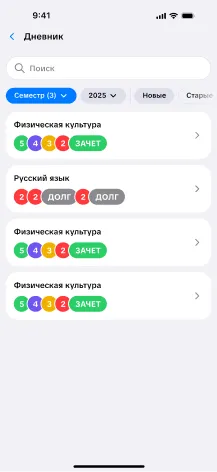
Detailed academic views provide immediate access to cumulative averages, attendance statistics, and grade histories.
8. Reflections and Engineering Conclusions
By September 2026, the service remains a completely independent product. The college administration is unlikely to formally adopt it, nor is there any practical need. While the official schedule website remains impaired by network errors, our PWA boots every morning on the smartphones of hundreds of students and faculty members. The project has expanded beyond a student lookup tool: instructors consult it daily to track teaching hours and schedule gaps, while student representatives identify open classrooms for consultation sessions and exam preparation.
Final Technology Stack
| Domain | Technologies |
|---|---|
| Frontend | React 19, TypeScript, Vite, PWA (vite-plugin-pwa, Cache Storage), Capacitor, Redux Toolkit, React Router 7, SCSS Modules, Tabler Icons |
| Backend | Python, FastAPI, Uvicorn, Tortoise ORM, PostgreSQL (asyncpg), Pydantic v2 |
| Parsing & PDF | Camelot (lattice, OpenCV), PyMuPDF, Pandas, BeautifulSoup4 |
| Infrastructure | Linux VPS, Nginx (SSL Let’s Encrypt, HTTP/2, Gzip), Web Push (VAPID) |
Looking back across eighteen months of iterations, breakthroughs, and sleepless nights, three core engineering principles stand out:
- Vibe-coding is valuable only as a spark for rapid hypothesis validation. Rapid prototyping to explore a concept is wonderful. But pushing uninspected code to production creates an architectural debt time bomb. True reliability emerges only when you deeply master
line_scale,joint_tol, Service Worker lifecycles, and network session management. - The ability to delete code is more important than the ability to write it. Discarding thousands of lines of carefully crafted forum code was emotionally taxing. Yet removing 4,500 lines of dead weight transformed the product from an overloaded monolith into a lean, fast, and indispensable utility. Fall in love with solving the user’s problem, not with your own code.
- PWA is an unmatched superpower for independent developers. The freedom from $99 annual store developer fees, bureaucratic review delays, instant deployment velocity, and true offline reliability makes the progressive web the premier medium for independent, community-driven software.
Software engineering is not about following fleeting industry trends. It is about having the resolve to take a broken, inconvenient PDF document and transforming it into an everyday tool that makes life noticeably easier for real people around you.
Immense gratitude to designer Arlen for visual design, infinite patience with design revisions, and shared belief in the project.