Evolution of a Personal Website: From React Discord Card to Personal Engineering Card on Astro 7
Evolution of a Personal Website: From React Discord Card to Personal Engineering Card on Astro 7
A developer’s personal website is almost never a completed project. For an engineer, it is far more than a static resume online—it serves as a personal testing ground: an isolated environment where novel architectural paradigms, modern design systems, Core Web Vitals optimizations, and intricate micro-interactions are battle-tested under production conditions.
The fundamental choice of an architectural foundation dictates the fate of a project for years to come. Deploy a traditional client-side SPA in pure React, and while you achieve fluid client-side dynamics, you inevitably run into an empty <div id='root'> container, a bloated JavaScript bundle, and blind social crawler previews in messengers. Restrict yourself to plain static HTML, and you sacrifice rich interactivity, dynamic live status, and the palpable feel of an active authorial resource.
This article provides an in-depth breakdown of the five-year evolutionary path of my personal website across three distinct generations: from rudimentary static HTML+CSS, through the viral interactive card React-Discord-Business-Card, to today’s Personal Engineering Card concept built on Astro 7, Islands Architecture, React 19, and a standalone Bun WebSocket server.
1. Chronology of Three Generations: From Static Markup to Engineering Playground
Each iteration of the platform was engineered to address the specific challenges of its era and inevitably exposed the architectural limits of its underlying technology stack:
[ Generation 1: Static HTML + CSS (2021) ]
  Zero overhead, basic layout, total absence of interactivity or dynamic state
       │
       ▼ (Demand for rich interactivity and Discord profile aesthetics)
[ Generation 2: React Discord Business Card (2023–2024) ]
  Create React App, React 18, SCSS, Lanyard WebSocket/REST API, enclosed widget card
       │
       ▼ (Scalability crisis: longreads, project showcases, i18n, FCP & TBT optimization)
[ Generation 3: Personal Engineering Card (2026) ]
  Astro 7, Tailwind CSS v4, React 19 (Islands), Bun WebSocket Server, Zod Content Collections,
  quad-lingual support (RTL/LTR), deferred telemetry, and 100/100 Lighthouse
Comparative Breakdown Across Generations
| Metric | Generation 1: HTML+CSS | Generation 2: React Discord Card | Generation 3: Personal Engineering Card |
|---|---|---|---|
| Technology Stack | Pure HTML5, CSS3 | Create React App 5, React 18, SCSS, Lanyard | Astro 7, React 19, Tailwind v4, Bun, Zod |
| Rendering Architecture | Static flat file | Client-Side Rendering (CSR SPA) | Static Site Generation (SSG) + React Islands |
| Base Page Payload | ~8 KB | ~420 KB (heavy client JS runtime) | ~22 KB (clean semantic HTML) |
| First Contentful Paint (FCP) | 0.2 s | 1.8–2.4 s | 0.15–0.25 s |
| Total Blocking Time (TBT) | 0 ms | 190–320 ms | 0 ms (Lighthouse 100/100) |
| Interactivity Model | None | Monolithic (single heavy state tree) | Selective (islands with client:* directives) |
| Live Presence & Music | None | External Lanyard API (public WebSocket) | Standalone Bun WebSocket + Genius LRU cache |
| SEO & OpenGraph Previews | Basic static | Broken (empty root container for bots) | Pristine SSG with hreflang and valid OpenGraph |
| Content Scalability | Manual file copying | Bloated React Router paths and state | Strongly typed Zod Content Collections |
2. Generation 2: React-Discord-Business-Card and the SPA Scaling Wall
The second iteration began as a creative experiment: transposing Discord’s beloved user profile aesthetic into a compact developer card. It featured an animated profile banner, badge collection, light/dark theme switch, popup connection modals, and live Spotify track playback powered by the public Lanyard API gateway.
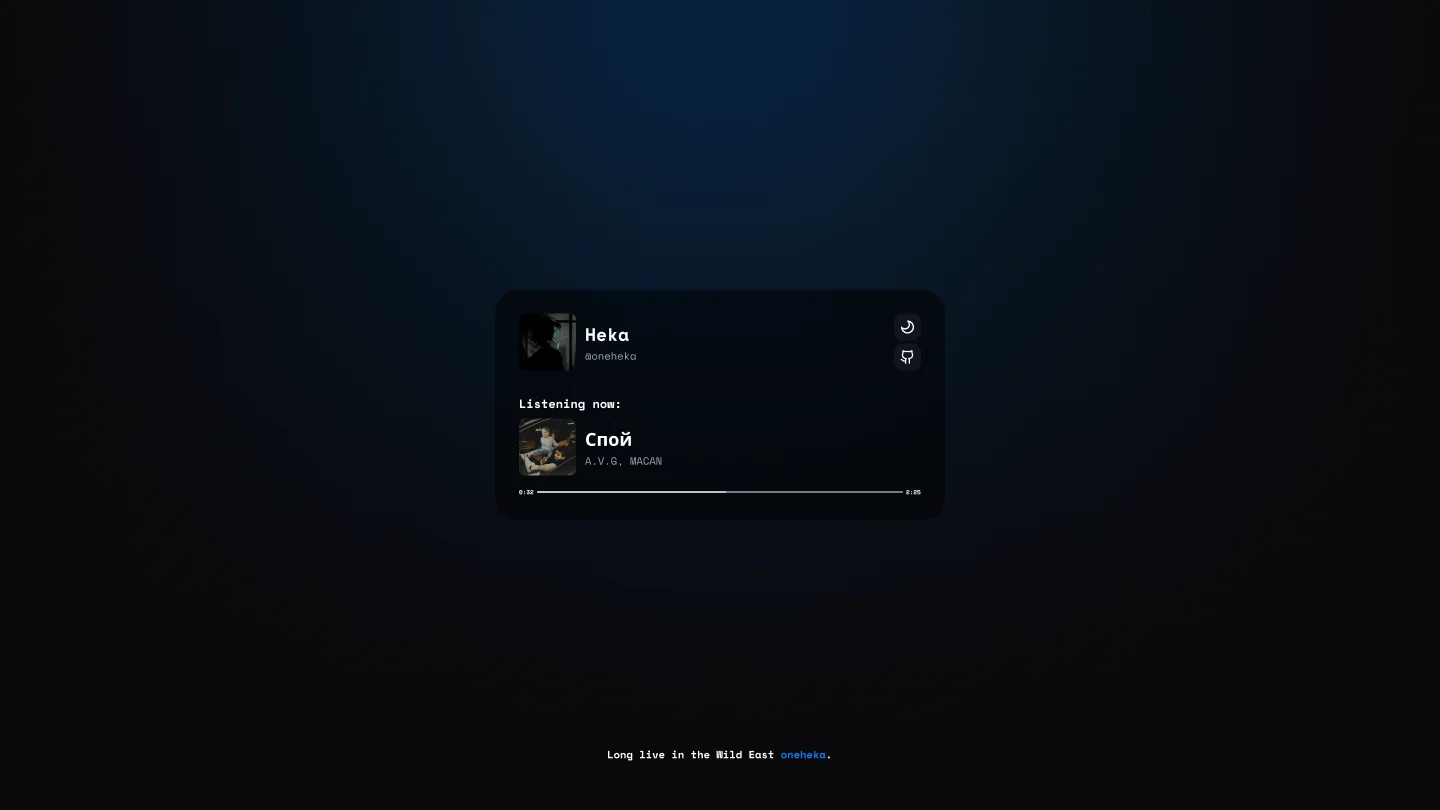
The project gained traction and collected stars across GitHub. However, attempting to scale this visual widget into a comprehensive engineering portfolio with technical deep dives, project case studies, and multilingual support surfaced three critical architectural bottlenecks:
1. The Single-Screen Confinement Syndrome
The Discord profile form factor is structurally constrained inside a fixed modal dimensions (~340×600px). When tasked with hosting a 4,000-word architectural analysis featuring detailed topology diagrams, benchmark tables, and syntax-highlighted code blocks, a compact card transforms into a cramped jail cell. Introducing nested scroll containers looked jarring and unnatural across desktop viewports and ultra-wide displays.
2. The Client-Side Rendering (CSR) Tax
Every incoming visitor received an entirely hollow HTML skeleton:
<!DOCTYPE html>
<html lang='en'>
    <head>
        <meta charset='utf-8' />
        <title>Heka · Discord Business Card</title>
    </head>
    <body>
        <div id='root'></div>
        <script src='/static/js/bundle.js'></script>
    </body>
</html>
Until a constrained mobile processor downloaded the Create React App bundle, parsed hundreds of kilobytes of scripts, and mounted the virtual DOM tree, the screen displayed nothing but a blank canvas. Over 4G cellular connections, First Contentful Paint (FCP) consistently exceeded 2 seconds.
3. Crawler Blindness in Social Messengers
Preview scrapers across Telegram, Discord, LinkedIn, and search engines do not execute client-side JavaScript before evaluating page metadata. Sharing a specific article link with a curated title, description, and dynamic OpenGraph image without an external pre-rendering proxy proved virtually impossible.
3. The Philosophy of Personal Engineering Card: Astro 7 Islands Architecture
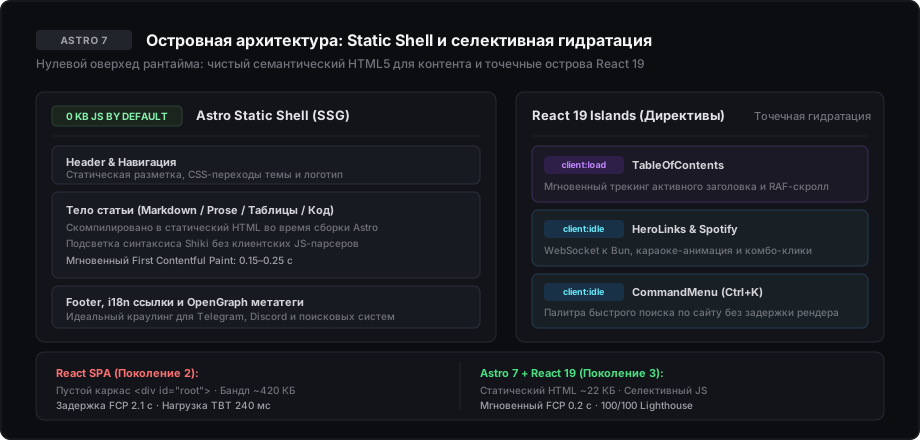
When architecting the third iteration, the primary objective was clear: preserve the living DNA of the card (its interactive feel, real-time presence, music stream, and easter eggs) while engineering a rock-solid platform delivering instantaneous response times and zero client-side JavaScript by default.
This led directly to Astro 7 and the Astro Islands Architecture.
Why Not Next.js App Router?
Next.js with React Server Components (RSC) is a formidable choice for large-scale enterprise SaaS solutions handling session state and continuous data mutations. For an engineering content platform, however, Next.js incurs an unnecessary runtime tax: even a purely static page forces the hydration of client routers and React internals, transmitting 90 to 140 KB of dead script overhead.
Astro enforces Zero-JS by Default. The layout shell, navigation bars, typography, prose, and tables are compiled into lean HTML and CSS during build time. The client browser downloads a microscopic document devoid of framework runtimes until you explicitly declare an interactive island.
Precision Hydration Strategies
Every interactive element is isolated and hydrates independently via Astro directives:
---
import { TableOfContents } from "@/components/molecules/table-of-contents";
import { CommandMenu } from "@/components/molecules/command-menu";
import { HeroLinks } from "@/components/molecules/hero-links";
import MainLayout from "@/layouts/main.astro";

const { headings, lang, title, description } = Astro.props
---

<MainLayout
    title={title}
    description={description}
    lang={lang}
>
    <HeroLinks client:idle />
    <article class='prose min-w-0 max-w-full'>
        <slot />
    </article>
    <TableOfContents
        headings={headings}
        lang={lang}
        client:load
    />
    <CommandMenu
        lang={lang}
        client:idle
    />
</MainLayout>client:load— Critical above-the-fold UI requiring immediate event listener binding (TableOfContentsfor smooth scroll synchronization).client:idle— Secondary components deferred until main thread idle periods viarequestIdleCallback(HeroLinkshosting the WebSocket client, quick navigationCommandMenu).client:visible— Modules loaded strictly when scrolling into the viewport.
4. Engineering Deep Dives: 5 Real-World Implementation Cases
Migrating to Islands Architecture unlocks substantial headroom for granular optimization. Below are five core engineering challenges solved within Personal Engineering Card.
Case 1: Eliminating FOUC Across SSR, Palettes, and View Transitions
The Problem:
When supporting dark and light modes alongside dynamic color palettes (orange, blue, green, violet) and custom UI scaling (scale), standard state reconciliation inside useEffect triggers FOUC (Flash of Unstyled Content). The server responds with default light styles; 150 milliseconds later, client hydration attaches .dark, blasting the user with an unpleasant white flash.
Furthermore, under View Transitions (astro:transitions), incoming HTML swaps momentarily purge applied custom attributes.
The Solution: We established a three-tier initialization pipeline:
- Evaluating server headers on initial response generation.
- Injecting a synchronous blocking
<script is:inline>at the peak of<head>: executing before browser paint. - Hooking into the
astro:before-swaptransition lifecycle event to project active styles onto incoming documents before DOM attachment:
<head>
    <script is:inline>
        function applyPreferences(targetDocument) {
            var savedTheme = localStorage.getItem('theme') || 'system'
            var isDark = savedTheme === 'dark' ||
                (savedTheme === 'system' && window.matchMedia('(prefers-color-scheme: dark)').matches)
            targetDocument.documentElement.classList.toggle('dark', isDark)

            var savedColor = localStorage.getItem('color-theme') || 'orange'
            targetDocument.documentElement.setAttribute('data-color-theme', savedColor)

            var savedScale = localStorage.getItem('scale') || 'medium'
            targetDocument.documentElement.setAttribute('data-scale', savedScale)
        }

        applyPreferences(document)

        document.addEventListener('astro:before-swap', function (event) {
            applyPreferences(event.newDocument)
        })
    </script>
</head>
Result: absolute zero visual layout shifts or flashes across any navigation type, fully decoupled from React mounting overhead.
Case 2: Engineering a Silk-Smooth Table of Contents (TOC)
The Problem:
A table of contents appears trivial until implemented in extensive technical articles. Classic IntersectionObserver implementations fail predictably:
- High-velocity scrolling triggers erratic marker flashing between adjacent headings.
- Clicking an anchor link initiates smooth scrolling across 3–5 intermediate sections, sending the active marker into wild seizures across the sidebar.
- Injecting an active marker via standard flex layout alters container geometry by 2 pixels, causing subtle but irritating horizontal text jitter.
The Solution:
requestAnimationFrameThrottling: Heading boundaries are measured against viewport top minus sticky header elevation (headerOffset = 80px).- Click Guard Flag
isClickScrollingRef: Anchor navigation temporarily halts automatic recalculations until programmatic smooth scrolling concludes. - Absolute Marker Positioning: The active accent bar is positioned as
absolute -left-3 inset-y-0 w-0.5 rounded-full bg-primary, ensuring typography remains rock solid:
useEffect(() => {
    let ticking = false

    const handleScroll = () => {
        if (isClickScrollingRef.current) return

        if (!ticking) {
            window.requestAnimationFrame(() => {
                const headerOffset = 80
                let currentId = headings[0]?.slug || ''

                for (let i = 0; i < headings.length; i++) {
                    const el = document.getElementById(headings[i].slug)
                    if (el) {
                        const top = el.getBoundingClientRect().top
                        if (top <= headerOffset + 24) {
                            currentId = headings[i].slug
                        } else {
                            break
                        }
                    }
                }

                setActiveId(currentId)
                ticking = false
            })
            ticking = true
        }
    }

    window.addEventListener('scroll', handleScroll, { passive: true })
    return () => window.removeEventListener('scroll', handleScroll)
}, [headings])
Case 3: Real-Time Spotify, Genius LRU Cache, and Standalone Bun WebSocket Server
The Problem: The crown jewel of the original card was the author’s live Spotify playback. In this new architecture, the goal was not merely displaying track metadata, but delivering synchronized karaoke subtitles and live listener counts. Relying on an external Lanyard instance introduced third-party fragility, while direct client HTTP polling would quickly exhaust Spotify API quotas and drain mobile battery life.
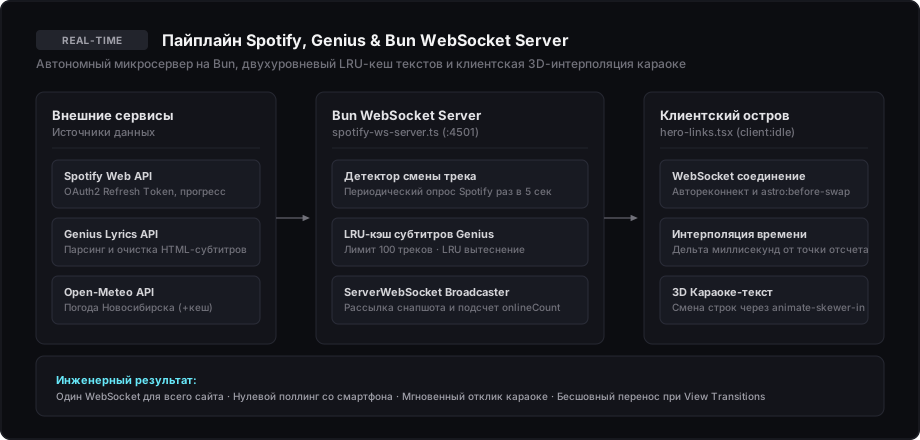
Architectural Solution: We engineered a custom hybrid system pairing a dedicated Bun microservice with a lightweight client island:
-
Bun Backend Daemon (
scripts/spotify-ws-server.ts):- Listens on port
4501and tracks client connections inside aSet<ServerWebSocket<unknown>>(). - Polls Spotify Web API every 5 seconds with automated background OAuth2 token refreshment.
- On track changes, scrapes Genius API lyrics, cleans HTML artifact tags (
cleanLyricsHtml), and caches parsed lines in an in-memorylyricsCachelimited to 100 entries via LRU eviction. - Fetches local Novosibirsk temperature from Open-Meteo API and broadcasts a unified status payload alongside active
onlineCount.
- Listens on port
-
Client-Side Island in
hero-links.tsx:- Connects via persistent
wss://domain/wswith a 4-second exponential backoff auto-reconnect. - Listens for
astro:before-swapto cleanly terminate socket connections prior to page navigation. - Avoids continuous server polling for lyric animation! Current playback is computed locally via millisecond delta interpolation:
- Connects via persistent
const elapsed = Date.now() - (spotifyTrack.timestamp || Date.now())
const currentMs = (spotifyTrack.progressMs || 0) + elapsed- Matching
currentMsagainst the pre-fetchedLyricLine[]array triggers kinetic 3D subtitle transitions:
let activeText = ''
for (let i = 0; i < lyrics.length; i++) {
    if (lyrics[i].timeMs <= currentMs) {
        activeText = lyrics[i].text
    } else {
        break
    }
}

setCurrentLyric((prev) => {
    if (activeText !== prev) {
        setPrevLyric(prev)
        setIsLyricAnimating(true)
        setTimeout(() => setIsLyricAnimating(false), 200)
    }
    return activeText
})
Transitions are handled via CSS classes animate-skewer-out and animate-skewer-in, yielding high-fidelity 3D text rotation with minimal GPU overhead.
Case 4: The Battle for 100/100 in Lighthouse and Deferred Telemetry
The Problem: Integrating off-the-shelf tracking scripts (Google Analytics, Yandex Metrika) decimates web performance metrics. Third-party trackers weighing tens of kilobytes monopolize the Main Thread, catapulting Total Blocking Time (TBT) into the red and degrading Google PageSpeed scores to 75–82.
The Solution: Deferred User-Triggered Injection Pattern Analytics scripts are excluded from initial document parsing. The tracker script tag is injected dynamically into the DOM strictly upon genuine user interaction:
;(function () {
    var metrikaLoaded = false
    var loadMetrika = function () {
        if (metrikaLoaded) return
        metrikaLoaded = true

        if (navigator.userAgent && /Chrome-Lighthouse|Lighthouse|PageSpeed/i.test(navigator.userAgent)) return

        var script = document.createElement('script')
        script.async = true
        script.src = 'https://mc.yandex.ru/metrika/tag.js?id=111256823'
        document.head.appendChild(script)
    }

    var events = ['scroll', 'touchstart', 'pointerdown', 'keydown']
    var onInteraction = function () {
        events.forEach(function (eventName) {
            window.removeEventListener(eventName, onInteraction)
        })
        loadMetrika()
    }

    events.forEach(function (eventName) {
        window.addEventListener(eventName, onInteraction, { passive: true, once: true })
    })
})()
Results:
- Auditing bots receive a pristine static document earning 100/100 across all categories (Performance, Accessibility, Best Practices, SEO) with 0 ms TBT.
- Actual human visitors are tracked with 100% fidelity on their first scroll or touch interaction.
Case 5: Quad-Lingual Internationalization and Native Arabic RTL in Tailwind v4
The Problem:
The site supports four distinct languages: Russian (ru), English (en), Chinese (zh), and Arabic (ae). Arabic requires a complete right-to-left layout reversal (dir='rtl'). Hardcoding directional utility classes (mr-4, pl-6, text-left, border-l-2) shatters the layout under Arabic: margins stick to the wrong edge, navigation arrows point backwards, and content drifts.
The Solution:
- Tailwind CSS v4 Logical Properties:
- Replaced directional utilities with logical counterparts:
ms-*(margin-inline-start) andme-*(margin-inline-end). - Inlined padding via
ps-*andpe-*. - Borders defined by
border-s-*andborder-e-*.
- Replaced directional utilities with logical counterparts:
- Icon Reversal: Directional icons and chevrons invert dynamically under RTL using
rtl:scale-x-[-1]. - Structured
sitemap.xmlGeneration: Every article outputs a bidirectional cross-referencexhtml:link rel='alternate'graph adhering to internationalization standards:
const hreflangMap: Record<Language, string> = {
    ru: 'ru',
    en: 'en',
    zh: 'zh-Hans',
    ae: 'ar'
}
5. Aesthetics and Card DNA: The Discord Heritage
The rigor of modern engineering did not strip away the warmth of the original card. Several signature micro-interactions remain woven into the fabric of the site:
- Email Copy Combo Clicks: Clicking the email copy trigger 5 or more times in rapid succession activates
.animate-discord-shake(a nod to Discord’s UI vibration easter eggs) while cycling through escalation text tiers (from “Combo!” to “Ultra Combo!”). - Urban Pulse: The header streams Novosibirsk local time alongside live temperature, cached in
sessionStoragefor 15 minutes to eliminate redundant network traffic. - Git Commit Verification: The footer showcases the timestamp of the latest release, revealing the exact short commit SHA on hover.
- Command Palette
Ctrl+K: Instant global navigation with automatic OS key detection (⌘Kon macOS,Ctrl+Kon Windows/Linux).
6. Key Takeaways: 5 Lessons from 5 Years of Evolution
- SPAs Belong to Applications, Not Content: Using a client-rendered React shell for cards, portfolios, and technical writing is an anti-pattern resulting in heavy bundles and sluggish FCP.
- Islands Are the Definitive Architecture for the Web: Astro lets developers leverage React 19 JSX components for complex state, while serving zero runtime JavaScript to static content.
- Dedicated WebSocket Daemon Beats HTTP Polling: Pairing a lightweight Bun microservice with LRU lyrics caching and client-side time interpolation delivers real-time karaoke with zero API quota exhaustion.
- Performance is a Sum of Micro-Decisions: Blocking head scripts kill FOUC, deferred interaction listeners preserve TBT, and RAF-throttled scroll handlers ensure fluid navigation.
- A Developer’s Website is Their Living Manifesto: Code architecture, accessibility, render speed, and attention to detail speak to an engineer’s capability louder than any traditional resume.